Olungu
Top Freedom Alternatives for Smarter Browser Focus Management in 2026
Freedom's domain blocklist frustrates knowledge workers who need the same sites they're trying to avoid. Here are the best alternatives for 2026.

Founder of Olungu and a software engineer with over 10 years of experience building technology products. He writes about productivity, focus, behavioral psychology, and evidence-based strategies for achieving goals and doing deep work.
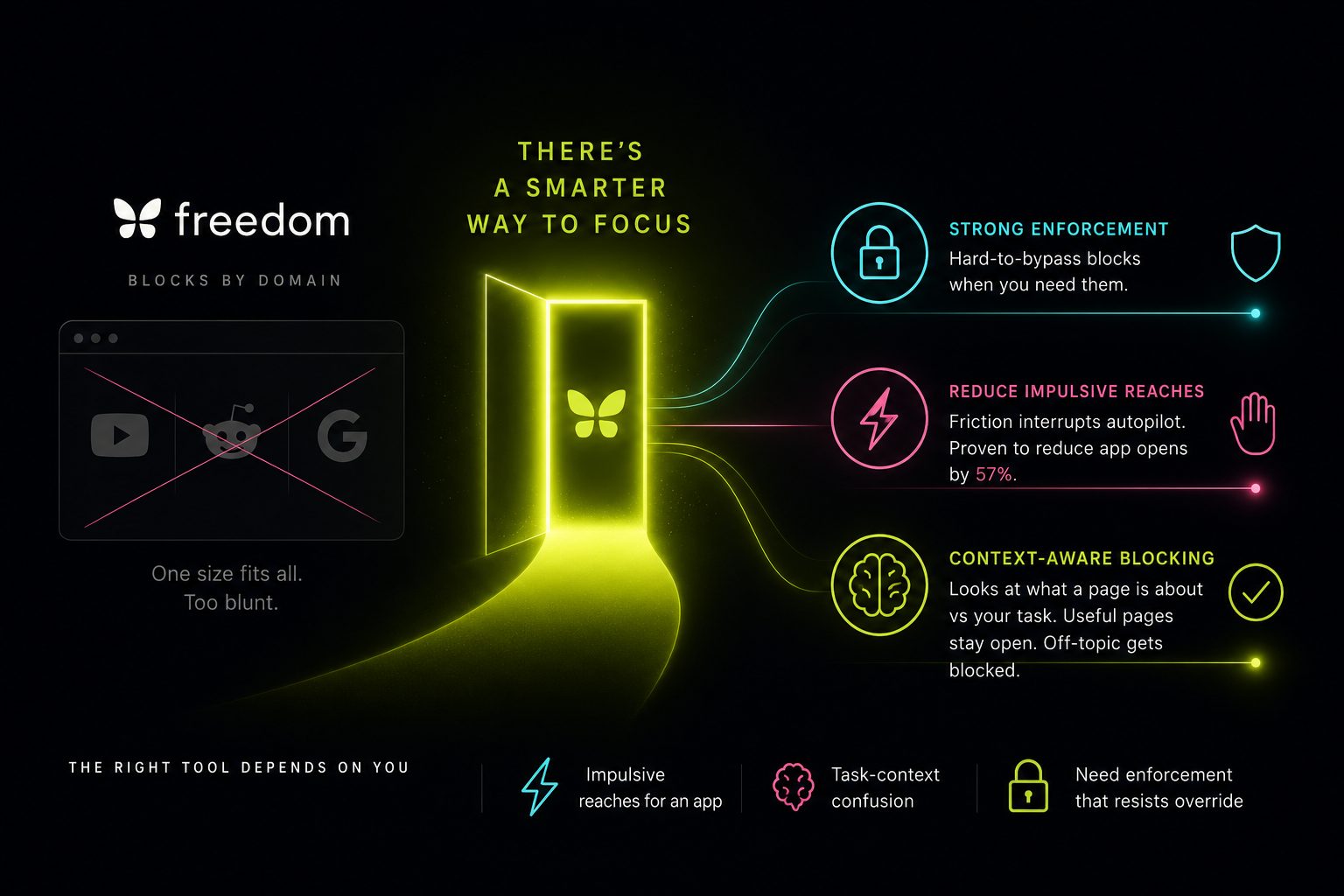
If Freedom's all-or-nothing blocklist approach is cramping your workflow, the category has diversified considerably. The best alternatives range from ruthlessly strict desktop blockers to context-aware tools that let useful pages through while still stopping time-wasting detours—depending on whether your main problem is impulse control, a specific platform, or a blocker that treats every YouTube URL identically regardless of what you're actually watching.
Freedom's domain-level blocking creates a genuine problem for knowledge workers who legitimately need sites like YouTube, Reddit, and Google—usefulness depends on the specific page, not just the domain.
Cold Turkey offers the strongest desktop enforcement with one-time pricing and hard-to-bypass blocks, but provides no context awareness and limited mobile support.
Friction-based tools like One Sec work through behavioral interruption rather than hard blocks—a Max Planck Institute study found a 57% reduction in social media app opens, though the effect holds only when the failure mode is impulsive rather than intentional.
Context-aware blocking evaluates what a page is actually about against the user's current task, so useful pages stay open while off-topic ones get blocked—without requiring an ever-growing manual allowlist.
The right alternative depends on where focus breaks down and what's driving it: impulsive reaches for an app, task-context confusion in the browser, or needing enforcement strict enough to resist a conscious override.
Why People Leave Freedom
Freedom has real strengths. Its cross-device session sync is genuinely hard to beat, and locked mode works for people who need external enforcement. But according to critics on review platforms, a meaningful share of users eventually hit the same wall: domain-level blocking is a blunt instrument for modern knowledge work.
You're writing a technical article and need YouTube for a tutorial. Freedom sees youtube.com and either blocks the whole domain or lets it all through. No middle ground. The same problem applies to Reddit, Google, and dozens of platforms where usefulness depends entirely on which page you're on.
Other friction points that push people toward alternatives:
- Subscription cost. At $39.99/year, Freedom is among the pricier options; its Forever plan runs $199 one-time, per its own pricing
- Bypass vulnerability on mobile. VPN-based blocking can be defeated by switching off Wi-Fi or uninstalling the app
- No free tier worth using. Seven total sessions isn't a real trial
- No context awareness. The blocker has no idea whether the page you're opening is related to what you're supposed to be doing
Before switching tools, identify your actual failure mode. If you mostly lose time on your phone, a desktop-centric alternative won't fix it. If browser tab drift during work is the issue, a browser-level tool with smarter classification will serve you better than a stricter blocklist.
Freedom Alternatives Compared
| Tool | Blocking Type | Context Aware | Free Tier | Pricing | Platforms |
|---|---|---|---|---|---|
| **Olungu** | Browser extension, AI-classified | ✅ Yes | ✅ Yes | Free / Plus / Pro / LTD | Chrome (cross-browser sync) |
| **Cold Turkey** | Desktop system-level | ❌ No | ✅ Limited | $39–$45 one-time | Windows, Mac |
| **SelfControl** | Mac hosts file | ❌ No | ✅ Free | Free | Mac only |
| **LeechBlock NG** | Browser extension | ❌ No | ✅ Free | Free | Major browsers |
| **One Sec** | Friction/delay | ❌ No | ✅ 1 app | ~$50/year | iOS, Android |
| **Opal** | Hard block + gamification | ❌ No | ❌ No | $99/year | iOS only |
| **Forest** | Gamified focus sessions | ❌ No | Varies | $2–4 one-time | iOS, Android, Chrome |
| **DigitalZen** | Desktop + browser | ❌ No | ✅ Basic | Free / $3/mo / $119 LTD | Windows, Mac, Linux |
| **RescueTime** | Time tracking + soft blocks | ❌ No | ✅ Limited | $12/mo or $78/yr | Cross-platform |
The Main Contenders
Cold Turkey — For Users Who Need No Escape Hatch
Cold Turkey is the closest thing to Freedom for desktop users who want enforcement rather than friction. Its "Frozen Turkey" mode can lock down the entire Windows machine—not just a browser tab—and once a block is active, there's no practical way past it. Deliberately so.
Where it wins over Freedom: one-time pricing ($39–$45 depending on when you buy) instead of an annual subscription, and widely regarded as harder to circumvent on desktop. Where it loses: no context awareness whatsoever, no mobile app worth mentioning, and a reputation for occasionally causing issues on macOS. If your problem is laptop distraction during work hours, Cold Turkey is a credible straight swap—just don't expect it to learn anything about your workflow.
SelfControl — The Free Mac Option
SelfControl modifies your Mac's hosts file for a set duration. Dead simple, genuinely unbypassable, and completely free. It's also unmaintained, has no scheduling, no app blocking, and you'll outgrow it fast once your blocking needs become more nuanced. Useful as a starting point; a poor long-term solution for anyone whose requirements evolve.
LeechBlock NG — Best Free Browser-Only Blocker
For pure browser blocking without spending anything, LeechBlock NG is the default recommendation. Highly configurable time-based rules, works across major Chromium browsers, and has been around long enough to be genuinely reliable. A user who switches browsers can bypass it instantly, and it won't touch desktop apps. For solo knowledge workers whose temptation stays browser-based, those limitations rarely matter.
One Sec — Friction-First, Not Blocking
One Sec takes a philosophically different approach: insert a breathing pause—five to ten seconds—before a distracting app opens. No hard block. A published study conducted with the Max Planck Institute reported a 57% reduction in social media app opens among participants. That number is real and worth taking seriously.
The effect depends entirely on what's driving the problem, though. One Sec builds internal awareness by interrupting the automatic reach for an app; it doesn't enforce limits on someone who's consciously decided to waste time. Someone in a sustained browsing session who's actively procrastinating gets no resistance from a five-second delay they can dismiss. One Sec and hard-block tools aren't substitutes—they intercept different moments entirely. Priced around $50/year; mobile-only.
Opal — iOS-Specific Hard Blocking
Opal is the closest thing to Freedom for iPhone-first users. Device management profiles make blocks legitimately hard to bypass. Gamification, streaks, and a social layer differentiate it from built-in Screen Time, which most people learn to route around quickly. At $99/year and iOS-only, it's a real commitment—but for users whose main distraction surface is their phone, Opal is the better-designed product for that specific job.
DigitalZen — The Windows Multi-Lock Option
DigitalZen runs on Windows, Mac, and Linux with five distinct lock mechanisms—code, cooldown, friend approval, schedule, money penalty—works offline, and includes tamper protection against uninstalling. At $3/month billed annually or $119 lifetime, it's reasonably priced for desktop users who want multiple deterrents rather than a single lock style.
The Gap None of the Above Fill
Every tool in the comparison above shares one structural limitation: none of them understand what you're doing. They see a domain, not a page. They see youtube.com, not "this is a four-minute tutorial on CSS grid that I need open right now."
Most blockers block domains. The problem is that modern work lives on the same domains as modern distraction.
This is the constraint that shapes every workaround people build. Elaborate allow-lists and block-lists still end up either over-blocking (killing legitimate research tabs) or under-blocking (whitelisting YouTube, then spending forty minutes in a recommendations spiral). The maintenance burden compounds, edge cases multiply, and most users quietly stop maintaining their lists within a few weeks.
None of the major players—not Cold Turkey, not Freedom, not LeechBlock—have meaningfully addressed this in their architecture. The category default is still: give the user more granular blocklist controls. More time windows, more lock modes, more list management. The assumption is that the problem is enforcement, not classification.
Olungu: Context-Aware Focus Blocking
Olungu takes a structurally different approach. Rather than matching a URL against a domain list and returning a binary result, it evaluates each page against what you're actually trying to accomplish.
The mechanism works in layers. Every URL you navigate to first hits a deterministic rules check—four domain lists (Block, Allow, Gateway, and Sensitive) in strict priority order, so known-safe or known-distracting domains get resolved instantly without any AI involvement. Only pages that rules can't classify proceed to AI evaluation.
Setting a specific task context—not just "work" but something like "writing a technical comparison of PostgreSQL vs. MySQL for a B2B SaaS audience"—is what shifts Olungu from a general blocker to something targeted. The AI receives your task context alongside the page content and classifies accordingly. Vague task descriptions produce vague classification.
That AI evaluation is driven by Olungu's Guard Profile: a general distraction profile (things you always want blocked) combined with a task context (what you're working on right now). Both get compiled into a prompt injected at classification time. When you're writing code and open a Stack Overflow thread, the AI classifies it as relevant. An entertainment subreddit mid-session gets classified as irrelevant and blocked before the page loads. The same reddit.com/r/programming thread might be allowed when your task context describes debugging a Python library and blocked when your context is "finish Q3 financial report." Same URL, different verdict—because the context changed.
The Gateway List handles genuinely mixed domains—YouTube, Reddit, search engines—where blocking or allowing the whole domain would be wrong in both directions. Navigate to the YouTube homepage and it passes through; navigate to youtube.com/watch?v=... and the extension evaluates whether the video is on-task before the page loads. Google, Bing, DuckDuckGo, Yahoo, and YouTube are gateways by default.
Over time, Guard Learning picks up on patterns. If the AI classifies a domain as distracting several times within a rolling seven-day window, it auto-promotes that domain to a hard block rule—future visits skip AI evaluation entirely. The lists maintain themselves, which matters in practice: the biggest reason people abandon static blocklists is the maintenance cost of keeping them current.
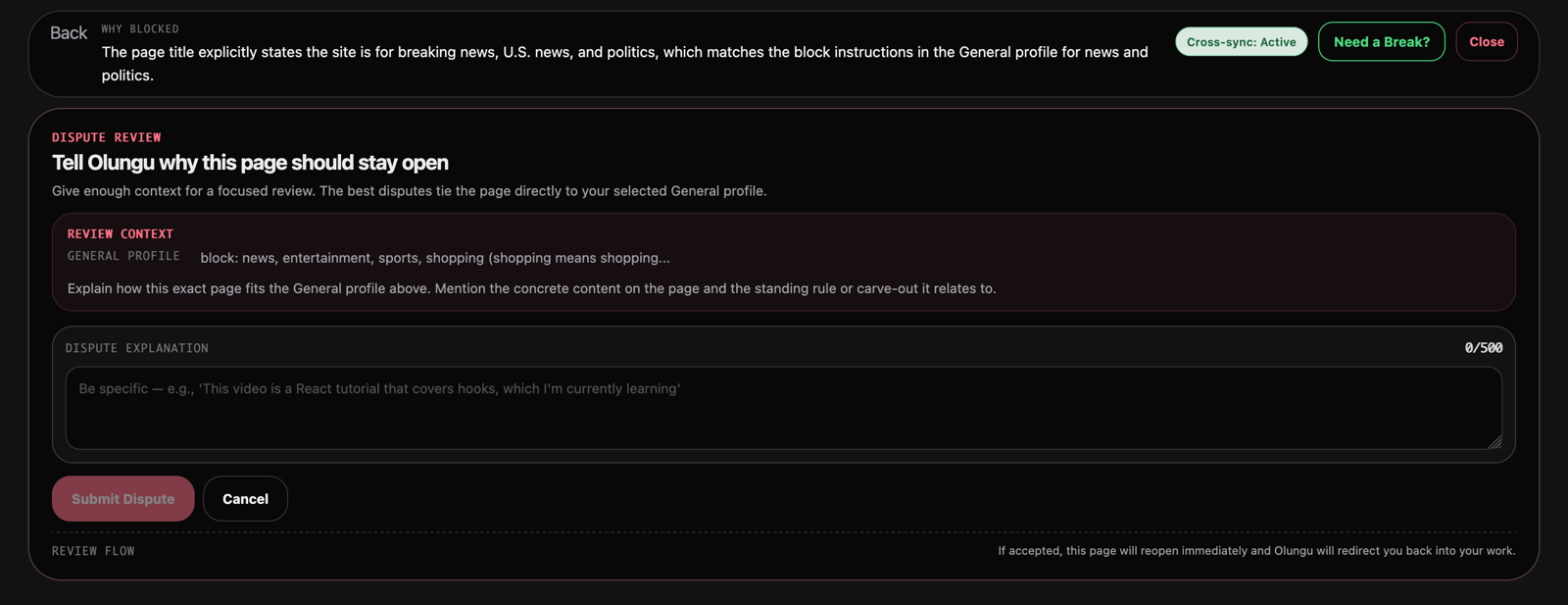
For incorrectly blocked pages, the Dispute & Unblock flow lets you contest a decision directly from the block screen. Olungu re-evaluates in context, and if it accepts your reasoning, it suggests a Guard Profile update so the same site isn't flagged again. For hard-blocked domains, it can issue a 24-hour temporary bypass while keeping the permanent block rule intact.
A few other features worth knowing:
- Guard Off Challenge — requires typing a custom sentence or watching a timed YouTube clip before Focus Guard can be turned off, so disabling protection is a deliberate act rather than a reflex
- Rabbithole Watch — per-site time budgets for domains that are allowed but easy to overuse, with progressive warnings at 50%, 75%, 90%, and 100% of your budget
- Value Protection — translates blocked distractions into a monetary estimate based on your hourly rate, making the cost of time drift concrete rather than abstract
- Focus Breaks — earned rest periods that suspend blocking for a set duration then automatically re-engage, without touching your persisted Guard toggle
Olungu's AI runs in three modes: Managed AI (provided by Olungu, no setup), BYOK (bring your own Anthropic, OpenAI, or Gemini key), or Local Model (runs entirely on-device via Ollama or browser built-in AI). The local model option is notable because most context-aware tools in this space require cloud calls for every classification—creating both latency and a privacy trade-off. Running classification on-device eliminates both.
For a direct side-by-side breakdown, see the Olungu vs Freedom comparison.
How to Choose
Two questions cut through most of the decision: Where do you actually lose time—phone, browser, or desktop? And what's the failure mode—impulsive opens, or a situation where you've already decided to open something and need external resistance you can't easily override?
For desktop work where maximum enforcement matters more than flexibility, Cold Turkey's one-time pricing and hard-lock modes make it the Freedom swap with the least ongoing cost. iPhone-first users get meaningfully better enforcement from Opal's device management profiles than from anything browser-based. Free browser blocking that doesn't require an account points straight to LeechBlock NG.
The harder case is the knowledge worker whose job genuinely requires YouTube tutorials, Reddit threads for technical debugging, Google Scholar searches, and Stack Overflow—all the same domains that also serve up rabbit holes. A stricter blocklist shifts the frustration from "I keep getting distracted" to "my blocker keeps killing pages I need." Context-aware classification changes that calculus: Olungu doesn't ask you to choose between blocking YouTube and needing YouTube—it evaluates each URL against what you said you're working on.
Context-aware tools do require a meaningful task description to work well. A vague context like "work stuff" gives the AI very little to evaluate against, and classification quality drops accordingly. The more specific your Guard Profile, the more precisely the tool distinguishes a useful database documentation page from a random news detour.
See also: How to Break Up Long-Term Goals Into Smaller, Manageable Pieces for the habit side of the equation, and Managing 15-Hour Work Days Without Burning Out if the focus problem is embedded in a broader overwork pattern.
If you want a browser extension that understands what you're working on rather than just where you're browsing, try Olungu free—the free tier includes core focus features and enough AI quota to properly evaluate whether context-aware blocking fits your workflow before you upgrade.
Frequently asked questions
Freedom is one of the most widely used, and its cross-device session sync is genuinely strong. However, it uses domain-level blocking with no page context, which means it over-blocks sites you need and under-blocks when you whitelist a domain that contains both useful and distracting content. Whether it's "best" depends entirely on whether your problem is enforcement across devices or smarter classification within a browser.
For browser-only blocking, LeechBlock NG is the strongest free option—flexible time-based rules, no account required, works across major browsers. For context-aware blocking with a free tier, Olungu offers core focus features at no cost. SelfControl is a solid free choice for Mac users who want something unbypassable but simple.
With domain-level blockers like Freedom or Cold Turkey, no—you either block all of YouTube or allow all of it. Olungu handles this through a Gateway List: the YouTube homepage passes through, but individual video URLs get classified against your current task context before the page loads. A tutorial relevant to your project gets allowed; a random recommendation gets blocked.
The research is honest about this distinction. Studies cited on Freedom's own site show meaningful productivity gains during active sessions—but those are session-level effects, not habit formation. Awareness-based tools like One Sec aim at building internal awareness that persists after the tool is switched off; the Max Planck Institute study reporting a 57% reduction in app opens is the most concrete published figure for that approach. Most people benefit from some combination: enforcement during sessions and friction-based interruption to chip away at impulsive opens over time.
Most blockers show a block page with no recourse. Olungu has a built-in Dispute & Unblock flow—you can contest the decision directly from the block screen, and if your reasoning is accepted, the extension suggests a Guard Profile update so the same site is handled correctly going forward. For hard-blocked domains, it can issue a 24-hour temporary bypass while keeping the permanent block rule intact.
Browser extensions like LeechBlock NG are browser-specific and only protect the browser they're installed in. Olungu syncs your domain lists, Guard Profile, session history, and AI classification cache across every browser where you're signed in—including adaptive sync that speeds up when it detects you're actively using multiple browsers simultaneously.