Olungu
Olungu vs Freedom: Which Focus Tool Fits Modern Browser Work Best?
Olungu vs Freedom compared: context-aware AI blocking vs static domain lists. See which focus tool handles real browser work — YouTube, Reddit, and search included.

Founder of Olungu and a software engineer with over 10 years of experience building technology products. He writes about productivity, focus, behavioral psychology, and evidence-based strategies for achieving goals and doing deep work.
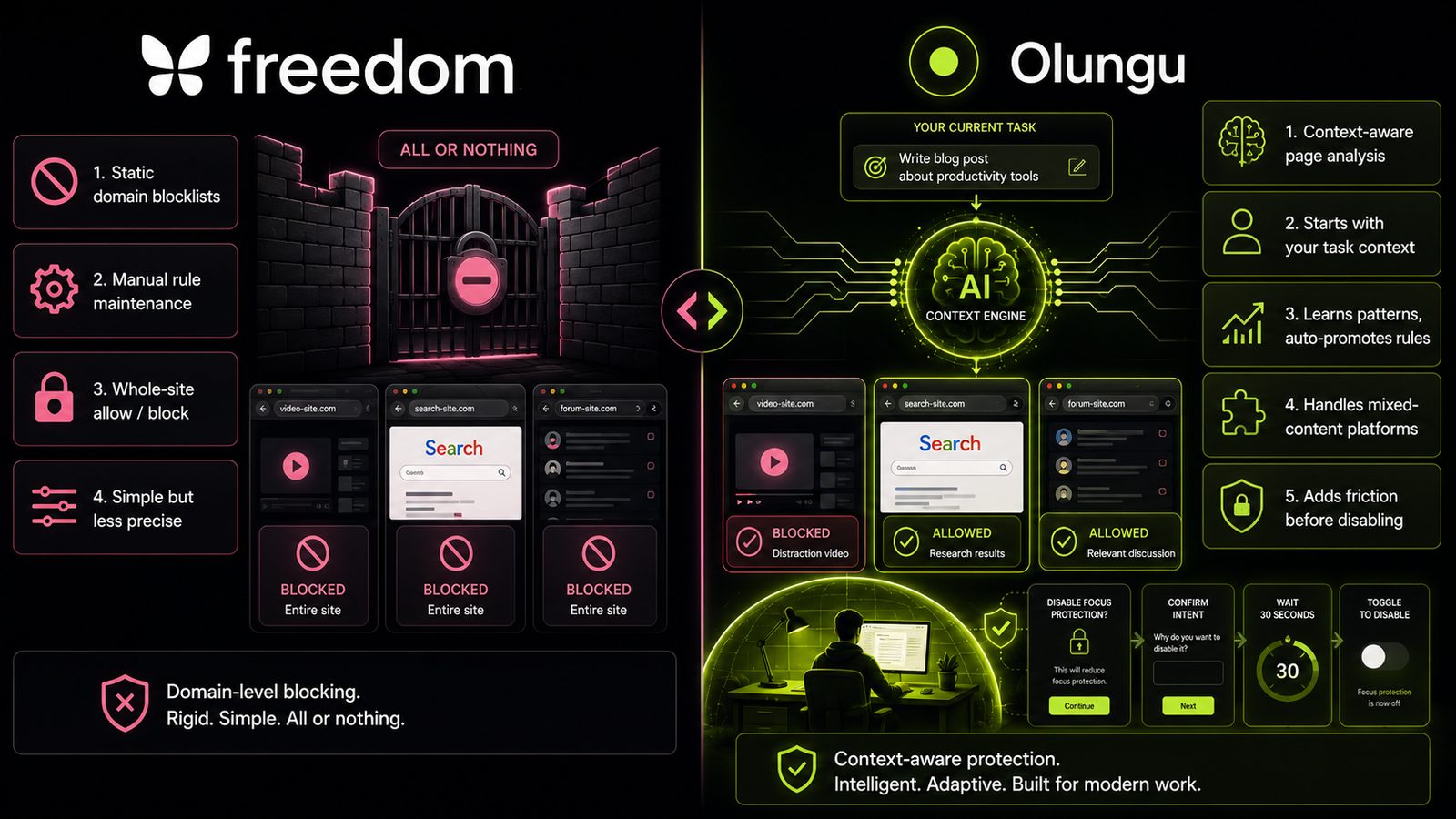
Olungu and Freedom are both focus tools that block distracting websites, but they work from fundamentally different assumptions about how people actually browse while working. Freedom blocks domains. Olungu evaluates what a page is actually about — and that distinction changes nearly everything about how the tool behaves in practice.
Context-aware blocking evaluates what a page is actually about, not just its domain — this matters most for sites like YouTube, Reddit, and search engines where one page can be essential and the next a distraction.
Static blocklists require constant manual maintenance as your work evolves, while AI-driven systems can learn your patterns and auto-promote frequently blocked or allowed domains to hard rules.
Bypass resistance is as much a behavioral design problem as a technical one — adding deliberate friction before disabling protection is more effective than enforcement that can be easily circumvented.
Mixed-content platforms are where most real browsing decisions happen; a tool that can only say yes or no to an entire domain is solving a simpler version of the problem than most knowledge workers face.
Starting with a clear task context — what you're working on right now — is the input that makes context-aware focus blocking meaningfully more precise than a generic blocklist.
The core philosophical difference
Most website blockers, Freedom included, treat the internet as a fixed map of good and bad destinations. You draw a line: Reddit is distracting, Notion is productive. The blocker enforces the line. This works well enough if your work and your distractions live on completely separate domains — but most knowledge workers don't have that luxury.
A developer debugging a problem needs Stack Overflow, YouTube tutorial videos, and GitHub. A writer researching an article needs Google, Wikipedia, and sometimes Reddit threads. A student working on a literature paper might legitimately need YouTube for a documentary and Twitter for a primary source. Static blocklists struggle here because the same domain can be essential or a complete waste of time depending on what you're trying to do at that moment.
Freedom's approach is to let you build and schedule blocklists, and that's genuinely useful for people whose distractions are clean and predictable. But it leaves you managing an ever-growing list of exceptions and workarounds as your work evolves.
Olungu starts from the other direction. Rather than asking "which sites should be blocked?", it asks "what are you working on right now, and does this page serve that goal?" Every navigation is evaluated against your current Guard Profile — a plain-text description of your task and your standing distraction rules — before the page loads.
How blocking actually works
Freedom's model
Freedom uses scheduled blocklists across browsers and devices. You select which sites to block, optionally set a schedule or session timer, and Freedom enforces those rules. Locked Mode prevents you from stopping a session early.
The appeal is simplicity: set it, forget it, and the list enforces itself. The limitation, widely noted in user reviews, is that there's no nuance. A 2026 comparison of Freedom alternatives summarizes the core complaint: "No context awareness. YouTube is always blocked or always allowed. No in-between."
For someone whose work never touches YouTube or Reddit, this is fine. For anyone else, you're constantly toggling exceptions or choosing between letting all of a platform in or none of it.
Olungu's model
Olungu runs a layered evaluation on every URL before the page loads:
- Domain lists first. Olungu checks four lists in priority order — Block, Allow, Gateway, and Sensitive — before any AI is involved. Hard-blocked domains never load. Always-allowed domains load instantly. This keeps things fast for clear-cut cases.
- AI for ambiguity. When a URL doesn't match a rule, Olungu's AI evaluates the page against your Guard Profile. It receives the URL, page title, description, and your current task context, then returns a verdict —
relevant,irrelevant, orgateway— with a confidence score. - Gateway handling for mixed-content sites. YouTube's homepage loads freely.
youtube.com/watch?v=...gets AI-evaluated. A tutorial on soldering is let through; a compilation of gaming fails is blocked. Same domain, different outcome based on actual content.
This layered approach means Olungu isn't running AI on every page load — deterministic rules handle the easy cases, and AI steps in only where judgment is actually needed.
The Gateway List is where Olungu's context-awareness becomes most obvious. Google, YouTube, Bing, DuckDuckGo, and Yahoo are gateways by default — their homepages are allowed, but specific searches and videos are evaluated against your task context before loading.
Setting your focus context
Freedom asks: which sites do you want to block? Olungu asks: what are you working on?
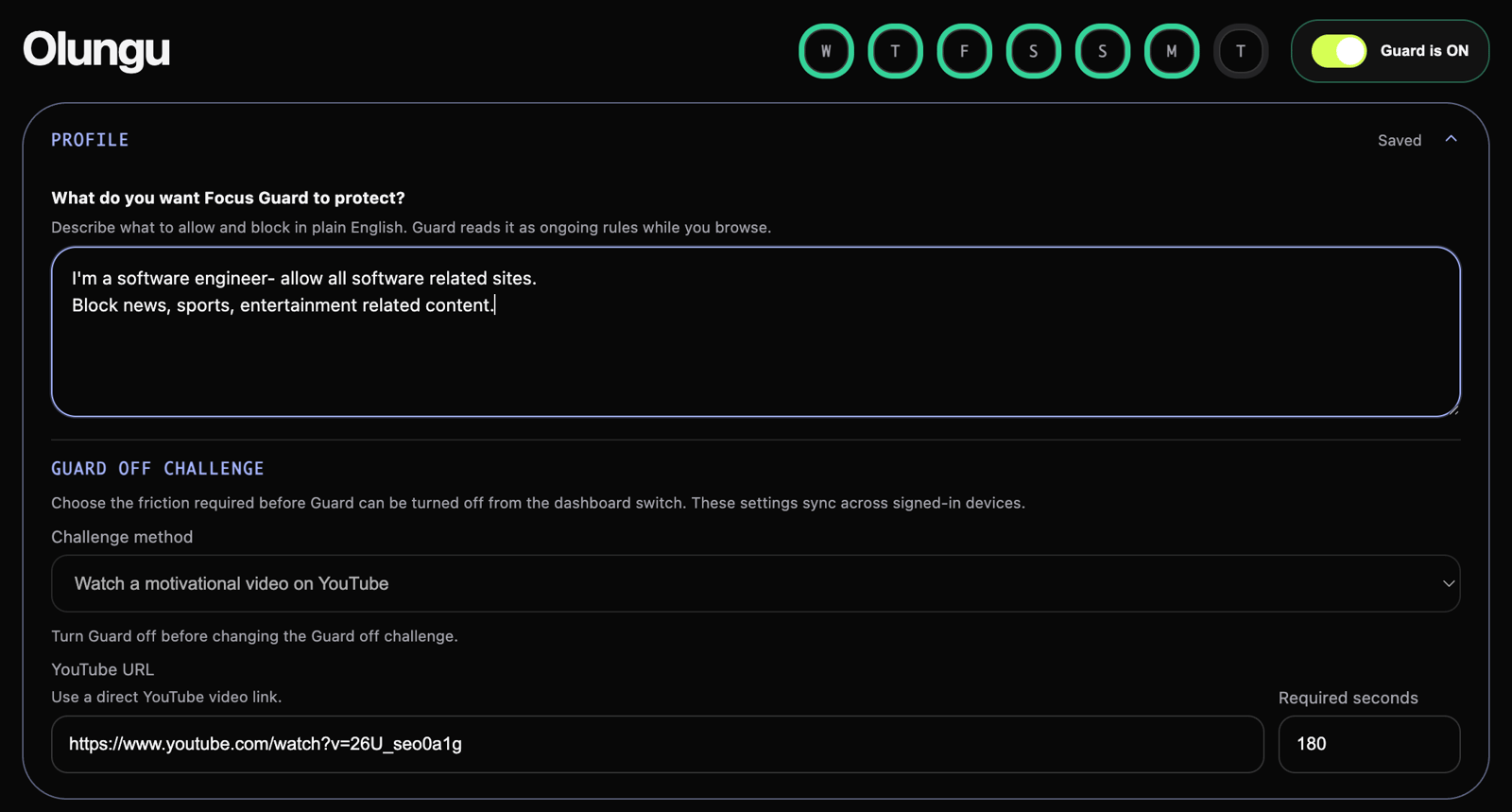
The Guard Profile is the key input. It has two parts: a general profile with standing rules ("block: news, entertainment, shopping") and a task context field where you describe your current focus goal in plain text. That task context is what enables context-aware blocking — the AI uses it to decide whether a page supports your work or derails it.
This means Olungu requires slightly more setup upfront — you need to write a task description — but it pays off every time a nuanced decision arises. A student who sets their task context to "writing a literature essay on Camus" will find that Albert Camus Wikipedia pages load, random Wikipedia rabbit holes don't, and a YouTube lecture on existentialism might pass through while a reaction video doesn't.
Freedom is zero-setup for the blocking itself: pick sites, block them. But that simplicity means you can't express "allow YouTube only if the video is about the thing I'm working on."
Learning and adapting over time
One of Olungu's more practical features is Guard Learning — what it calls AI-added rules. After the AI classifies a domain consistently enough within a rolling 7-day window, it auto-promotes that domain to a hard rule. A site that keeps getting blocked by AI becomes a permanent Block list entry. A site that keeps getting classified as relevant moves to the Allow list. Future visits are then decided instantly, without another AI call.
This is meaningful for performance and for evolving your workflow. Your domain lists gradually reflect your actual browsing patterns rather than your best guess at what's distracting made on Day 1.
Freedom doesn't learn. It enforces what you tell it, statically, until you manually change the list.
Dispute and recovery
Every focus tool gets things wrong. The question is what happens when it does.
With Freedom, a wrongly blocked domain requires you to end the session (or wait it out) and manually edit the blocklist. This works, but it interrupts your flow and doesn't prevent the same wrong call next time.
Olungu has a built-in Dispute & Unblock flow. When the block screen appears for a page that shouldn't be blocked, you dispute it directly from that screen. Olungu re-evaluates in context and — if your reasoning is accepted — suggests a rule addition to your Guard Profile so the same site is handled correctly going forward. For hard-blocked domains, a 24-hour temporary bypass is also available, separating the immediate need from a permanent profile fix.
The design philosophy here matters: Olungu treats a wrong block as information to learn from, not just an inconvenience to dismiss.
Feature comparison
| Feature | Olungu | Freedom |
|---|---|---|
| Blocking method | AI + rule-based, context-aware | Static domain blocklists |
| Mixed-content sites (YouTube, Reddit) | Evaluated per URL by AI | Block all or allow all |
| Task context | Yes — plain-text Guard Profile | No |
| Learns from patterns | Yes — auto-promotes AI verdicts to hard rules | No |
| Wrong block recovery | Dispute flow with profile suggestions | Edit blocklist manually |
| Bypass friction | Guard Off Challenge (custom sentence or timed video) | Locked Mode (session timer) |
| Session tracking | Focus Sessions with idle detection | Session timer |
| Per-site time budgets | Rabbithole Watch | No |
| Focus breaks | Earned Focus Breaks that auto-resume Guard | Full session stop |
| Cross-browser sync | Yes, including AI cache and domain lists | Yes |
| Privacy option | Local AI mode (on-device, nothing sent externally) | No equivalent |
| Free tier | Yes | No |
Where Freedom still has an edge
Freedom's simplicity is genuinely valuable for some users. If your work is offline-heavy and you only need the browser locked down during specific hours, Freedom's scheduling is mature and reliable. Locked Mode has real teeth — once a session starts, you can't easily stop it.
Freedom also has mobile blocking via VPN, which Olungu currently doesn't address (Olungu is a browser extension). For anyone whose distraction problem extends to their phone, Freedom covers a surface Olungu doesn't.
The bypass problem
Perhaps the most damaging practical criticism of Freedom is how easily it can be bypassed. User reviews compiled on the Freedom alternatives page include direct quotes: "I can get past it with ease." Freedom's VPN-based enforcement on mobile also creates network conflicts when users run an actual VPN for work.
Olungu's approach to bypass resistance is different. Rather than technical enforcement alone, it adds behavioral friction. The Guard Off Challenge can require you to type a custom sentence or watch a timed YouTube clip before turning Focus Guard off — making the act of disabling protection a deliberate choice rather than an impulsive one. That's a meaningfully different design philosophy: friction as a cognitive speed bump, not just a technical lock.
The hardest distractions to block aren't the ones your tool doesn't cover — they're the ones you let yourself bypass before your brain registers what you're doing.
Who should use which tool
Choose Olungu if:
- Your work regularly involves sites like YouTube, Reddit, Stack Overflow, or search — where one page is essential and the next is a detour
- You want the tool to adapt to your task, not require you to maintain an ever-growing blocklist
- Privacy matters and you want an on-device AI option
- You want structured focus sessions with tracking, streaks, and focus breaks that auto-re-engage Guard
- You want to start free and see if it works before paying
Stick with Freedom if:
- Your distractions and work live on cleanly separate domains with no overlap
- You need mobile blocking as part of the same system
- You prefer scheduling blocks in advance rather than managing a live task context
- Strict Locked Mode enforcement is non-negotiable and you don't trust yourself with any override path
The core insight worth sitting with: most knowledge workers in 2026 do not have cleanly separated productive and distracting domains. The web is too interconnected for that. A tool that can only say "yes" or "no" to an entire domain is solving a simpler version of the problem than most people actually have. Olungu is built for the messier, more realistic version — where your task context determines whether a page earns its place in your browser.
If you find yourself constantly toggling exceptions in Freedom, or blocking YouTube only to realize you actually need it today, that's a sign the static blocklist model has hit its ceiling for your workflow. It's worth breaking your goals into smaller, clearer task chunks first — the clearer your task context, the more precisely Olungu's AI can protect it.
Try Olungu free from the Chrome Web Store. Set a task context for your current project, run it for a few work sessions, and see how differently it behaves from a list-based blocker on sites like YouTube and Google.
Frequently asked questions
No — Olungu treats YouTube as a Gateway domain by default. The homepage is allowed, but individual video URLs are evaluated by AI against your current task context. A tutorial relevant to your work passes through; an unrelated video is blocked. This means you don't have to choose between blocking all of YouTube or allowing all of it.
Freedom cannot evaluate page content or context. It blocks or allows based on domain names in your blocklist. Whether a YouTube video is a work tutorial or a distraction makes no difference — if YouTube is blocked, every URL on youtube.com is blocked.
You dispute it directly from the block screen. Olungu re-evaluates with your reasoning and, if accepted, suggests a Guard Profile update so the same domain is handled correctly in future. For hard-blocked sites, a 24-hour bypass is also available as a separate option.
Olungu has a free tier with core focus features and a limited managed AI quota. Freedom has no free tier — paid plans start at a monthly subscription with no option to test before committing.
Olungu's Sensitive List lets you designate domains that are always allowed and never sent to the AI for evaluation. Banking sites, healthcare portals, and personal accounts belong here — they load without any blocking check and no page content is read by the extension.
The Guard Off Challenge is optional friction you configure to run before Focus Guard can be turned off. It requires a deliberate act — typing a custom sentence or watching a timed YouTube clip — rather than a single impulsive click. It's designed to create a cognitive pause between the impulse to stop working and actually disabling your protection.