Team Olungu
The short answer
- 1Can you turn off YouTube Shorts on a computer? No. YouTube's website has no switch for Shorts, so on desktop you need a browser extension or a built-in browser filter.
- 2What is the quickest free fix? Install a Shorts-hiding extension such as Unhook or BlockTube, turn on its Shorts option and reload YouTube. On Brave, switch on the built-in "YouTube Anti-Shorts" filter.
- 3Does "Not interested" remove Shorts for good? No. It hides the Shorts shelf on Home for a while, but Shorts still turn up in search and on channel pages.
- 4How do I block Shorts but keep tutorials? Hide Shorts with an extension. Then add a blocker that checks each video against your task, so tutorials stay open and off-task videos get stopped.
Olungu checks each video against the task you set: with the task "Learning Rust", a Rust tutorial on YouTube stays open and a YouTube Short is stopped. The Free plan is $0, no card needed.
Can you turn off YouTube Shorts on a computer?
No. YouTube has no setting on its website that turns Shorts off. Its help page on managing recommendations gives computer steps for "Not interested" and "Don't recommend channel", but its "see fewer Shorts" steps are only for the YouTube app.
So on a computer, the fix has to come from your browser.
| Method | Runs on | What it stops | What it misses | Cost |
|---|---|---|---|---|
| YouTube "Not interested" | Any browser | The Shorts shelf on Home, for a while | Search, channel pages, links to Shorts | Free |
| Unhook | Chrome, Firefox, Edge | Shorts, plus feed, sidebar, comments (your choice) | Off-task long videos | Free (optional donation) |
| BlockTube | Chrome, Firefox | Shorts, chosen channels, keywords, comments | Off-task long videos | Free, open source |
| Hide Youtube-Shorts | Firefox, incl. Firefox for Android | Shorts on Home, Subscriptions, search, Shorts tab | Off-task long videos | Free, open source |
| Brave "YouTube Anti-Shorts" | Brave | Shorts in search, sidebar, recommendations | Off-task long videos | Free, built in |
| LeechBlock NG path rule | Firefox, Chrome, Edge, other Chromium browsers | Pages at youtube.com/shorts | Shelves and thumbnails | Free |
| Olungu | Chrome, Edge, Brave, Dia, Firefox; Firefox for Android 142+ | Any off-task video or page, Shorts included | Does not hide shelves or comments | Free plan; paid plans |
Which extension hides YouTube Shorts on Chrome, Firefox and Edge?
Unhook, BlockTube and Hide Youtube-Shorts are three widely used free choices, and each has a Shorts switch. Facts are from each tool's own listing, as of November 2026.
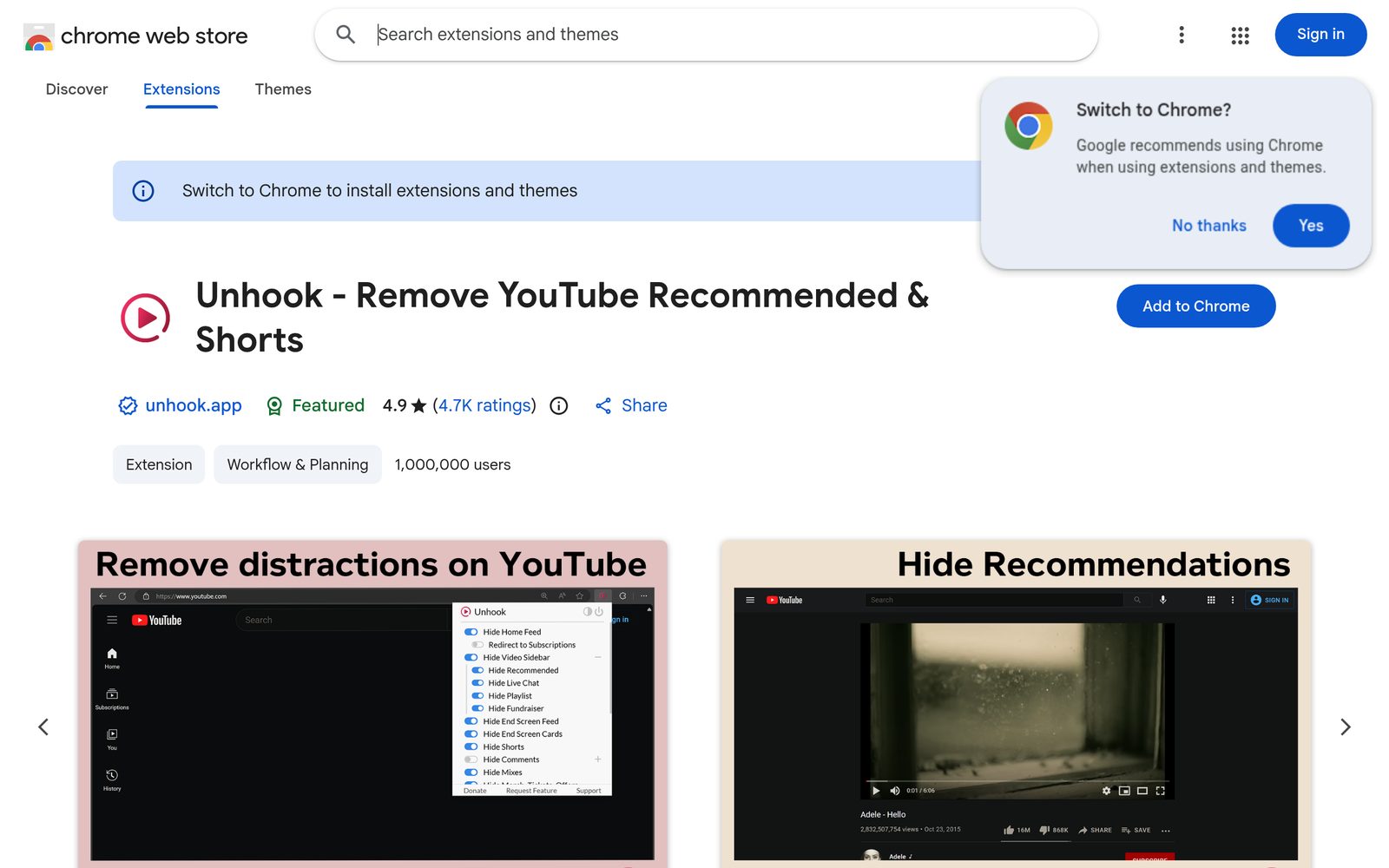
- Unhook: 1,000,000 users and a 4.9 rating on the Chrome Web Store, last updated March 2026. It hides Shorts, the home feed, sidebar, end screens and comments, each with a toggle. Its site lists Chrome, Firefox and Edge.
- BlockTube: 100,000 users and a 3.9 rating on the Chrome Web Store, updated February 2026, with a Firefox version. It lists "Block YouTube Shorts" plus blocking by channel, keyword and video length.
- Hide Youtube-Shorts: an open-source Firefox add-on (version 1.11.0, released April 2026) that also runs on Firefox for Android. It hides Shorts on Home, Subscriptions and search, and can hide the Shorts tab.
- 1Install from the official store
Use the Chrome Web Store (Chrome, Edge, Brave) or Firefox Add-ons.
- 2Open the extension
Click the puzzle-piece icon in the toolbar and choose the extension.
- 3Turn on the Shorts option
Switch on its "Shorts" or "Hide Shorts" option.
- 4Reload YouTube
Refresh open YouTube tabs.
Copycat names are common. A Chrome extension called "Hide Youtube Shorts" was found sending the full addresses of pages people visited to an outside server, and it was removed from the Chrome Web Store in November 2024 (security write-up). Check the developer, user count and update date first.
For a side-by-side look at these tools and others, see our Unhook alternatives comparison.
Can I block YouTube Shorts with a URL rule instead?
Yes. Every Short opens at an address that contains youtube.com/shorts/, so a blocker that matches paths can stop those pages. LeechBlock NG is free for Firefox, Chrome, Edge and other Chromium browsers. Its FAQ says you can block part of a site by adding a path after the domain, so the rule youtube.com/shorts blocks Shorts and leaves the rest of YouTube alone.
A path rule stops Shorts pages, not the rows of Shorts thumbnails on Home or in search. Our guides to blocking websites on Chrome and LeechBlock alternatives cover the setup.
In uBlock Origin, the element picker can save a filter that hides a Shorts shelf. Such filters can break when YouTube changes its layout (Detox guide).
On Brave, you don't need an extension. Brave's own post gives the path: Settings > Shields > Content Filtering, then enable the "YouTube Anti-Shorts" content filter (Brave on X). A walkthrough reports it removes Shorts from search, the sidebar and recommendations (Chipp.in).
What if hiding Shorts isn't enough?
Hiding Shorts cuts one route into a rabbit hole, but a long video from search, the sidebar or autoplay can take just as much time. Shorts are still worth stopping: a 2025 meta-analysis of 71 studies found that heavier short-form video use was linked to poorer attention and inhibitory control, though the studies show links, not cause.
You can turn autoplay off with the switch at the bottom of the player (YouTube Help). Blocking all of youtube.com also cuts off the tutorials you came for.
A task-aware blocker covers that gap. Olungu checks each video's address, title and a little page context against the task you describe. On-task videos stay open. On off-task ones you choose what happens: a block, a short breathing pause, grayscale, or a pause followed by grayscale.
The trade-off: Olungu does not hide the Shorts shelf, the sidebar or comments the way Unhook does. Many people will want both: Unhook for a cleaner page, Olungu to judge what they open. Our roundup of browser focus extensions compares more options.
Can you block YouTube Shorts on your phone?
No extension works inside the YouTube app; an extension only covers the browser it is installed in (Dam It guide).
On Android, Firefox runs add-ons: Hide Youtube-Shorts supports it, and Olungu runs on Firefox for Android 142 or later. Neither works in the YouTube app or on iPhone.
FAQ
Can you turn off YouTube Shorts on desktop?
Not with a YouTube setting. On a computer you need an extension, a path rule or Brave's built-in filter.
Does "Not interested" remove Shorts permanently?
No. It hides the Home shelf for a while, and Shorts keep appearing in search and on channel pages.
How do I block Shorts but keep YouTube for studying?
Hide Shorts with an extension such as Unhook, then use a blocker that checks each video against your task. Tutorials stay open, and off-task videos are stopped.
Is there a free way to block YouTube Shorts?
Yes. Unhook, BlockTube, Hide Youtube-Shorts, LeechBlock NG and Brave's Anti-Shorts filter are all free. Each covers a different part of the problem, so combining two is common.
Do Shorts blockers break when YouTube updates?
They can. A YouTube layout change can let Shorts slip through until the tool updates, so pick one whose listing shows a recent update.
Sources
- Manage your recommendations and search results - YouTube Help - https://support.google.com/youtube/answer/6342839?co=GENIE.Platform%3DDesktop&hl=en
- Turn autoplay on or off - YouTube Help - https://support.google.com/youtube/answer/6327615?co=GENIE.Platform%3DDesktop&hl=en
- How to Hide YouTube Shorts: Chrome, Firefox and Edge Extensions - Dam It - https://dam-it.io/guides/hide-youtube-shorts-desktop
- How to Block YouTube Shorts on Computer (and the Feed) - Detox - https://detox.so/blog/how-to-block-youtube-shorts-on-computer
- Unhook - Remove YouTube Recommended & Shorts - Chrome Web Store - https://chromewebstore.google.com/detail/unhook-remove-youtube-rec/khncfooichmfjbepaaaebmommgaepoid
- Unhook - official site - https://unhook.app/
- BlockTube - Chrome Web Store - https://chromewebstore.google.com/detail/blocktube/bbeaicapbccfllodepmimpkgecanonai
- BlockTube - Firefox Add-ons - https://addons.mozilla.org/en-US/firefox/addon/blocktube/
- Hide Youtube-Shorts - Firefox Add-ons - https://addons.mozilla.org/en-US/firefox/addon/hide-youtube-shorts/
- Malicious "Hide Youtube Shorts" extension in Google's Chrome Web Store - GitHub Gist - https://gist.github.com/c0m4r/45e15fc1ec13c544393feafca30e74de
- LeechBlock NG - official site - https://www.proginosko.com/leechblock/
- LeechBlock FAQ: Can I block only some areas of a site? - https://www.proginosko.com/leechblock/faq/block-only-some-areas/
- uBlock Origin wiki: Element picker - https://github.com/gorhill/uBlock/wiki/Element-picker
- How to block YouTube Shorts in Brave - Brave on X - https://x.com/brave/status/1988798919682454010
- Brave: it takes a few clicks to get rid of YouTube Shorts - Chipp.in - https://chipp.in/guides/brave-it-takes-a-few-clicks-to-get-rid-of-youtube-shorts-once-and-for-all/
- Nguyen et al. (2025), Feeds, feelings, and focus: a meta-analysis of short-form video use - Psychological Bulletin (PubMed) - https://pubmed.ncbi.nlm.nih.gov/41231585/
- Olungu - homepage - https://olungu.com/